 Written by Rona Sabatin
Content Writer, Johnson Creative · Updated
Why is my Spectrum router blinking red? It depends on your equipment. Spectrum says light colors vary by device model. On its Invincible WiFi router, a slow-fading red light means connectivity issues and solid red means router trouble. Check for an outage and your cables first. Then restart the modem and router, modem first.
Based on Spectrum's modem troubleshooting guide (updated September 2026) and Invincible WiFi troubleshooting page. Last verified Oct 19, 2026.
Is your Spectrum router blinking red and the internet down? Spectrum says light colors vary by device model. So what a red light means depends on which box is red and which equipment you have.
This guide uses only Spectrum’s own support pages. It shows what Spectrum says the lights mean, how to restart in the right order and where to go next.
What Does a Red Light on a Spectrum Router Mean?
It depends on your equipment. Spectrum says light colors vary by device model. For modem status lights, Spectrum says a light that is off, or blinking in a color other than what is typical during startup, usually points to a cable, power or signal issue.
| Modem status light | What Spectrum says |
|---|---|
| Solid and steady | Usually means everything is connected and working |
| Blinking during startup | Normal. It should settle within a few minutes |
| Off, or blinking in a color other than what is typical during startup | Usually points to a cable, power or signal issue rather than a problem with the modem itself |
| In an unusual state for more than 10 to 15 minutes after a full power cycle | A good sign to move on to the next steps |
Source: Spectrum, modem troubleshooting guide (updated Sep 25, 2026). Spectrum notes that exact colors vary by device model. Last verified Oct 19, 2026.
For the exact light pattern on your model, Spectrum says to check the label on your modem or look up your equipment details in the My Spectrum App.
Is the Red Light on Your Spectrum Modem or Your Router?
Check which box is red first. Spectrum describes the modem and router as two devices that work together. It says the modem connects to your internet provider and brings the internet signal to your home. The router “works with your modem to distribute that Internet connection throughout your home” and broadcasts the WiFi signal Spectrum.
| Box | What Spectrum says it does | If its light is red or unusual |
|---|---|---|
| Modem | Connects to your internet provider and brings the internet signal to your home | Match the label in the Spectrum modem lights table below. Check for an outage |
| Router | Works with your modem to share the connection and broadcasts the WiFi signal | Check the Ethernet cable to the modem, then restart, modem first |
| One combined box | Spectrum's restart steps say to unplug the combined unit instead of two devices | Restart that one box |
Source: Spectrum, Modem vs. router (updated Sep 9, 2026) and modem troubleshooting guide (updated Sep 25, 2026). Last verified Oct 19, 2026.
Not sure which box is which? See our guide to the modem and router.
What Does the Red Light Mean on Your Spectrum Equipment?
It depends on the device. Spectrum publishes a light list for its Invincible WiFi router and a table of modem light labels. Both are below.
Invincible WiFi Router
Spectrum’s Invincible WiFi troubleshooting page lists every router light. Spectrum defines “easing” as a slow fade between bright and dark, and “flashing” as a rapid on and off.
| Router light | What Spectrum says it means |
|---|---|
| Off | Device is off |
| Blue flashing | Device is booting up |
| Blue easing | Connecting to the internet |
| Blue solid | Connected to the internet |
| White solid | Backup mode is active |
| White flashing | Poor cellular reception |
| Red easing (slow fade) | Connectivity but no management access. Connectivity issues |
| Red and blue easing | Updating firmware. The device will automatically restart |
| Red solid | Router trouble |
Source: Spectrum, Invincible WiFi Troubleshooting (Article 382401). Easing is a slow fade. Flashing is a rapid on and off. Last verified Oct 19, 2026.
Invincible WiFi Battery Unit
The battery unit has its own light. A red light there is about the battery, not your internet.
| Battery light | What Spectrum says it means |
|---|---|
| Off | Device is off |
| Blue easing | Battery charging |
| Blue solid | Battery is fully charged |
| White easing | Battery is in use |
| Red easing | Lower battery |
| Red solid | Battery failure |
| Red, white and blue flashing | Battery critical failure |
Source: Spectrum, Invincible WiFi Troubleshooting (Article 382401). Last verified Oct 19, 2026.
Spectrum Modems
If the modem is the box with the problem light, match the label. Spectrum’s Understanding Modem Lights page lists them. Labels vary by modem.
| Modem light label | What Spectrum says it means |
|---|---|
| Diag, on or blinking | Your gateway (WiFi router combo) might be malfunctioning. Contact Spectrum. Off means it is working normally |
| Cable, Cable Link, WAN or Ready, blinking | Going through its startup and registration process |
| Cable, Cable Link, WAN or Ready, off | There is no cable connectivity |
| Cable, Cable Link, WAN or Ready, on | Registration is complete and the gateway is operational |
| Power or PWR, blinking | On some modems, startup diagnostics are in progress |
Source: Spectrum, Understanding Modem Lights. Spectrum says lights cycle during a reboot, so wait until startup ends before reading them. Labels vary by modem. Last verified Oct 19, 2026.
Other Spectrum Routers
This guide covers only the Spectrum equipment whose light meanings Spectrum publishes on the support pages we checked. Other Spectrum routers are not covered here, because their light meanings were not verified for this article. The restart order below comes from Spectrum’s general modem troubleshooting guide.

How Do You Fix a Blinking Red Light on a Spectrum Router?
Check for an outage, check the cables, then restart the modem and router in order. These steps follow Spectrum’s modem troubleshooting guide (updated September 2026).
- Check for a Spectrum outage with the Check Outages button on Spectrum’s outage page.
- Make sure the power cords and the Ethernet cable between the modem and router are plugged in securely.
- Restart in Spectrum’s order: unplug the modem and router for at least 30 seconds, then plug in the modem first and the router second. See our Spectrum restart steps for wait times.
- If a modem status light stays in an unusual state for more than 10 to 15 minutes after the restart, Spectrum says that is a good sign to move on to the next steps in its troubleshooting guide.
Spectrum’s WiFi router troubleshooting page adds that the router’s internet light comes on when the Ethernet cable to the modem is plugged in securely and both devices are on.
A restart is not a factory reset. For factory reset steps, see how to reset a Spectrum router.
What If You Have Invincible WiFi?
Invincible WiFi has a backup battery and a cellular backup, and Spectrum gives it its own steps. Spectrum says the battery “lasts up to 8 hours” and the router switches to 5G or 4G LTE backup during disruptions Spectrum.
If service is back but the router stays on backup (solid white light), Spectrum’s steps are:
- Unplug the modem’s power cord and remove the battery from the router.
- Leave both unplugged for at least 60 seconds.
- Plug the modem back in and wait for a solid blue light.
- Plug the battery back into the router.
Spectrum says the router light changes from solid white to solid blue when it stops using backup.
What Does a Solid Red Light Mean on a Spectrum Router?
On Spectrum’s Invincible WiFi router, Spectrum says solid red means “Router trouble.” On the Invincible WiFi battery unit, solid red means battery failure. Solid red on other Spectrum routers is not covered here, because those meanings were not verified for this article.
If you need Spectrum’s help, Spectrum lists Internet support at 888.369.2408, available 24/7 Spectrum.
Is It a Spectrum Outage or Your Equipment?
Check Spectrum’s outage status first. Then look at the lights after a full restart and match what you see below.
| What you see | What Spectrum says or where to look |
|---|---|
| Spectrum's outage check shows an outage in your area | Turn on outage alerts in the My Spectrum App to get updates |
| Modem Cable, WAN or Ready light is off | Spectrum says there is no cable connectivity |
| Modem Diag light is on or blinking | Spectrum says the gateway might be malfunctioning and to contact them |
| Invincible WiFi router is solid red | Spectrum lists this as router trouble. See Spectrum's Invincible WiFi troubleshooting page |
| Invincible WiFi router is solid white | Backup mode is active. If service is back, follow Spectrum's Invincible WiFi steps above |
| A modem status light in an unusual state more than 10 to 15 minutes after a full power cycle | Spectrum says to move on to the next steps in its troubleshooting guide |
| Lights look normal, but nothing loads | Read our guide to WiFi connected but no internet |
Based on Spectrum's outage information page, Understanding Modem Lights, Invincible WiFi Troubleshooting and modem troubleshooting guide. Last verified Oct 19, 2026.
If your lights look normal but nothing loads, read WiFi connected but no internet. For why the modem goes first, see how to power cycle a router and modem in the right order.
When Can Keep Connect Help With a Recurring Spectrum Problem?
Keep Connect can help compatible routers or modems when a power cycle resolves the connection problem. It cannot fix damaged equipment, cabling faults or an ongoing provider outage. Keep Connect automates an outside power cycle by cutting and restoring power. It does not use the router’s reset button.
| Situation | Can Keep Connect help? |
|---|---|
| A compatible router or modem where a power cycle resolves the connection problem | Potentially yes |
| An ongoing outage from your internet provider | No |
| A cabling fault | No |
| Damaged equipment | No |
| Invincible WiFi or other equipment with a backup battery | Contact Johnson Creative first |
Based on the Keep Connect manual (April 2026), the Keep Connect product page and Spectrum's light guides. Last verified Oct 19, 2026.
How Does Keep Connect Work?
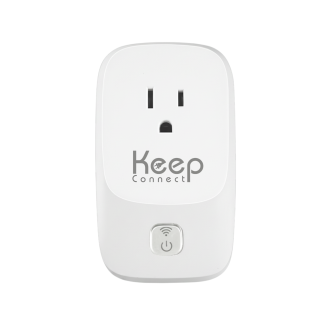
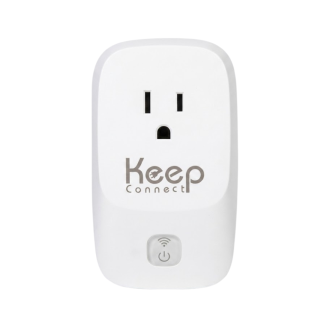
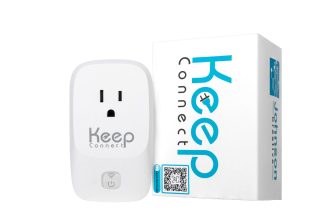
Keep Connect is an automatic router rebooter. It plugs into the wall, and compatible equipment plugs into it. By default, according to the Keep Connect manual:
- Every 5 minutes, it checks a primary test domain.
- If that check fails, it waits 1 minute and checks a secondary test domain.
- If both fail, it cuts power to your equipment for 30 seconds, then turns it back on.
- It waits 3 minutes for the equipment to start up, then checks again.
- Once the internet is back, it sends a notification by email or text, if you set one up.
After 3 resets in a row, it waits 4 hours before trying again. The manual says this prevents continuous rapid reboot cycles. These settings can be changed. Basic automatic rebooting needs no subscription. It is rated for a 10A total connected load and connects to 2.4 GHz WiFi only.
What Can't Keep Connect Fix?
Johnson Creative’s product page says it cannot repair damaged hardware, replace a faulty cable or restore service during an ongoing outage from your internet provider. During an outage, it may restart your equipment without bringing the internet back. Johnson Creative’s guide to minimizing unnecessary resets explains settings that cut extra restarts.
Does It Work With Invincible WiFi?
Contact Johnson Creative first. The Invincible WiFi router runs on a backup battery that Spectrum says lasts up to 8 hours. Keep Connect’s product page warns: “Removing external power may not shut down equipment with a working internal battery.” See the battery backup guide for what can be changed.

Keep Connect Automatic Router Rebooter
$49.99
- Checks your internet connection every 5 minutes by default
- Turns compatible equipment off for 30 seconds by default when the internet drops, then back on
- Sends an email or text when you are back online, if set up
- No subscription needed for basic automatic rebooting
- Connects to 2.4 GHz WiFi only (802.11 b/g/n, WPA or WPA2 Personal)
Rated for a 10A total connected load. Keep Connect cannot fix damaged equipment, cabling faults or an ongoing provider outage. Contact Johnson Creative first if your equipment has a backup battery, such as Invincible WiFi.
What Are the Key Takeaways?
Here is the short version, based on Spectrum’s own support pages.
- Spectrum says light colors vary by model. Check which box is red first, the modem or the router.
- On modems, Spectrum says a light that is off, or blinking in a color other than what is typical during startup, usually points to a cable, power or signal issue.
- Invincible WiFi: slow-fading red means connectivity issues. Solid red means router trouble. Fading red and blue means a firmware update.
- Restart in Spectrum’s order: unplug both for at least 30 seconds, modem first, router second.
- Modem status light still unusual more than 10 to 15 minutes after a restart? Spectrum says to move on to the next steps in its troubleshooting guide.
- Keep Connect can help only when a power cycle resolves the connection problem.
What Else Do People Ask About a Spectrum Router Blinking Red?
These answers come from the same Spectrum support pages used above.
Why is my Spectrum router blinking red?
It depends on your equipment. Spectrum says light colors vary by device model. On Spectrum's Invincible WiFi router, a slow-fading red light means connectivity issues and solid red means router trouble. For Spectrum modems, Spectrum says a light that is off, or blinking in a color other than what is typical during startup, usually points to a cable, power or signal issue.
Will restarting my Spectrum router fix a red light?
It can, but not always. Restart in Spectrum's order: unplug the modem and router for at least 30 seconds, then plug in the modem first and the router second. Spectrum says that if a modem status light stays in an unusual state for more than 10 to 15 minutes after a full power cycle, that is a good sign to move on to the next steps.
What if my Spectrum modem lights are blinking too?
Wait first. Spectrum says modem lights cycle during a reboot. A blinking Cable, WAN or Ready light means the modem is still starting up and registering. If that light is off, Spectrum says there is no cable connectivity. If the Diag light is on or blinking, Spectrum says the gateway might be malfunctioning and to contact them.
What does red and blue mean on a Spectrum router?
On Spectrum's Invincible WiFi router, a slow-fading red and blue light means it is updating firmware, and Spectrum says it will restart on its own. Other Spectrum routers are not covered in this guide.
How do I know if Spectrum has an outage?
Use the Check Outages button on Spectrum's outage information page. You can also turn on outage push alerts in the My Spectrum App: select More, then Settings, then Notifications. Under Push Notifications, choose Manage, then under Support turn on alerts for Outages.
What Should You Do Right Now?
Find which box is red and match it to the tables above. Check for a Spectrum outage and make sure your cables are plugged in securely. Then restart the modem first and the router second. If a modem status light stays unusual for more than 10 to 15 minutes, follow the next steps in Spectrum’s troubleshooting guide.
If a power cycle resolves the problem, see Keep Connect. It checks your internet and power cycles compatible equipment when the connection drops. Check its 10A load rating, and contact Johnson Creative first if you have Invincible WiFi.
Other provider guides: AT&T router blinking red and Xfinity router blinking orange. On Verizon? See what a Verizon router yellow light means. Using a different router? See what other router lights mean.
About the Author
Rona writes guides for Johnson Creative on router rebooting, internet reliability and home monitoring. Product details come from Johnson Creative's manuals and support articles. AI tools help with drafting, and every guide is reviewed and edited by Rona before publishing.