
Keep Connect MAX Router Rebooter

(8 customer reviews)

$74.99

Category:

Description

A 15A router rebooter for modems, routers and heavier equipment

Keep Connect by Johnson Creative is an automatic router rebooter. It monitors your internet connection and power cycles your modem or router when the connection drops, then sends a text or email when you are back online. No subscription is required for basic automatic rebooting.

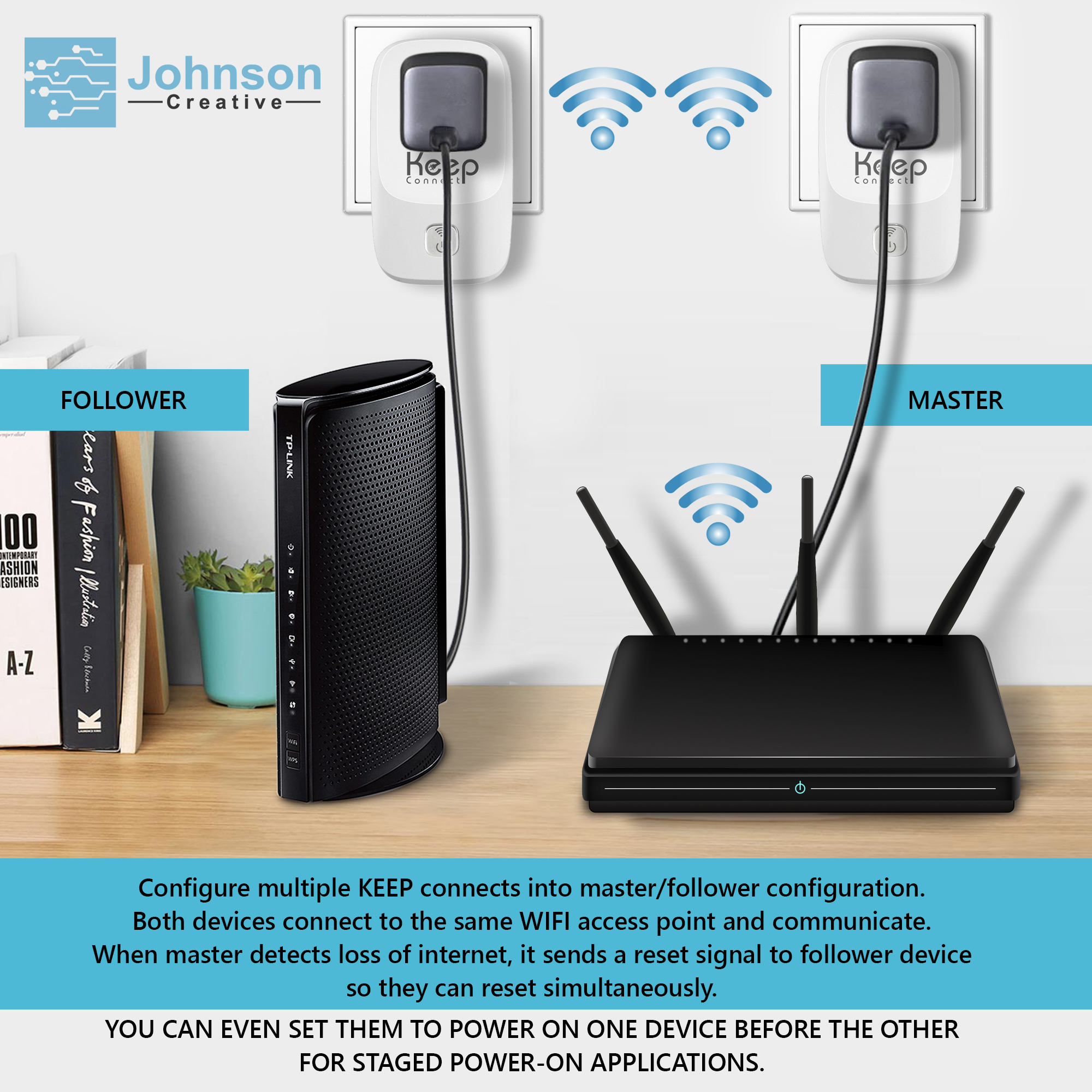
MAX is the upgraded model, with 15A-rated hardware instead of the Standard model’s 10A. It also supports Master/Follower mode, so two units can restart a modem and router in order, letting the modem finish booting before the router starts. Setup is done in a web browser over Wi-Fi, with no app to install.

MAX fixes the problems a power cycle can clear. It cannot fix an outage on your internet provider’s side, a damaged cable or failed hardware, and a higher current rating does not make your internet faster. If your setup fits a 10A load, the Keep Connect Automatic Router Rebooter costs $49.99.

What MAX does

Automate the router restart you would otherwise do yourself

An unresponsive router can interrupt work, disconnect a guest, or keep you from reaching equipment at another property. When a power cycle is the appropriate fix, someone usually has to find the outlet and restart the device.

Keep Connect MAX automates that step. It monitors connectivity and powers the connected equipment off and back on when its configured conditions are met.

You can use its default configuration or adjust the settings for your installation. Automatic restarting helps with recoverable equipment problems; it can’t fix an ISP outage, a damaged cable, or failed hardware.

Who it Helps

Built for places where a manual restart is inconvenient

Hotels and guest accommodations

Reduce the need for staff to visit compatible routers or modems to power-cycle them. MAX can help with equipment-related interruptions when a restart is the appropriate response.

Airbnb and short-term rentals

A guest’s connection problem should not always require a trip to the property. Configure automatic recovery before arrival and reduce the manual work involved when network equipment stops responding.

Remote locations and second homes

When the router is far away, a simple restart can become a long journey. MAX adds automatic power cycling to a compatible installation where physical access takes time.

Home offices and small businesses

Automate routine recovery steps and schedule planned restarts outside working hours.

Homes with connected devices

Help recover from router-related interruptions that affect access to cameras, thermostats, door locks, and other network-connected equipment.

MAX requires suitable power and a compatible network. It does not provide internet service or extend wireless coverage.

How it works

Connect, configure, and let MAX monitor your network

  1. Connect compatible equipment. Install MAX between a suitable power outlet and the router or modem power supply.
  2. Open the setup interface. Connect to Keep Connect’s WiFi setup network and complete the browser-based configuration.
  3. Choose your preferences. Configure monitoring, restart timing, and optional SMS or email notifications.
  4. Enable automatic recovery. MAX monitors connectivity and performs a power cycle when the configured failure conditions are met.

Features and Practical Benefits

Choose MAX for its hardware and configurable recovery

15A-rated hardware

MAX offers a higher current rating than the documented 10A Standard model. Match the connected equipment to MAX’s complete electrical specifications before installation.

The rating describes electrical capacity. It does not increase internet speed.

Configurable monitoring

Start with the default configuration, then adjust monitoring modes and timing settings when your network requires a different approach.

Scheduled router restarts

Configure periodic resets around your routine. Schedule planned interruptions outside guest check-in periods, meetings, or other important activities.

Coordinated modem and router recovery

Master/Follower configuration lets compatible Keep Connect units coordinate rebooting. For an appropriate setup, the modem can be brought back online before the router.

This requires multiple units and correct configuration; one MAX is not two independently controlled outlets.

SMS and email notifications

Enable notifications to receive information about device activity, or leave notifications disabled if you prefer.

Browser-based setup

Configure MAX without requiring a mobile app. Optional cloud services add app- and web-based management.


Specifications and Compatibility

Check your installation before ordering

Specification Keep Connect MAX
Brand Keep Connect
Model MAX
Product type Automatic router rebooter
Current rating 15A
Connectivity WiFi
Wireless band 2.4 GHz, single-band
Setup Browser-based configuration
Additional setup feature WPS, as listed in the supplied specifications
Monitoring Internet-connectivity monitoring
Restart options Automatic and scheduled
Notifications Configurable SMS or email
Multi-unit operation Master/Follower coordinated rebooting
Cloud management Optional subscription service

Use a compatible 2.4 GHz network. A dual-band router may provide a suitable connection when its 2.4 GHz network is enabled and configured compatibly.

Check the device’s voltage, frequency, plug type, and permitted loads before purchase. The 15A rating alone does not establish international compatibility.


Included features and Optional Services

Automatic rebooting included. Cloud management available separately.

Function Device functionality Optional cloud service
Cloud heartbeat notifications  — Available
Automatic power cycling Included Not required
Scheduled resets Included Not required
Browser-based configuration Included Not required
Configured device SMS/email notifications Included Not required
Master/Follower configuration with compatible units Included Not required
Managing devices across locations through the cloud Available
Remote settings and reboot requests Available

A device-generated reboot notification and a cloud offline notification serve different purposes. Device notifications depend on connectivity being available; cloud heartbeat monitoring can report that a device has stopped checking in.

A remote reboot request also needs a working communication path to reach the device. During complete internet loss, local automatic monitoring handles recovery attempts.

Product Comparison

Standard or MAX: choose the hardware that fits your setup

Feature Keep Connect Standard Keep Connect MAX
Primary purpose Automatic router/modem rebooting Automatic router/modem rebooting
Current rating 10A maximum in Standard documentation 15A in supplied MAX information
Automatic monitoring and restarting Yes Yes
Scheduled resets Yes Yes
Browser-based setup Yes Yes
Optional cloud management Available Available
Positioning Lower-cost option for compatible equipment Higher current rating and upgraded hardware

Choose Standard when its specifications meet your installation requirements and you prefer the lower-cost option.

Choose MAX when you want the MAX hardware and its 15A rating for a compatible installation.

Both products serve the same core purpose. Don’t present MAX as providing faster internet or guaranteed better recovery just because it has a higher current rating.

Compare the Standard model.

Setup and Documentation

8 reviews for Keep Connect MAX Router Rebooter

  1. Dave Tallbut

    We’ve been using Datto Managed Power devices for years and they’ve been discontinued. After a long search for a replacement that doesn’t cost a fortune we tested Keep Connect along with the Premium Cloud App service. It has worked perfectly in our lab environment and was simple to setup. Since then we’ve started deploying them to our clients. Their support team has been extremely responsive and open to adding features and enhancements. Ordering from their website directly was easy and the product shipped fast and arrived as expected.

  2. Robert Leo (verified owner)

    I have been using Keep Connect now for 3 years at my two properties. It works perfectly. I have Cable service from a provider in both locations and due to storms or cable events, my cable modem will lock up and freeze. I have WiFi and security cameras and if the Internet goes down I lose connectivity. With my Keep Connect, I am able to access my remote property and not worry about networking issues. As It will cycle the power on my cable modem and WiFi router to keep the network connected – pun – after an outage occurs. I would highly recommend it, so much so I bought two, one for each house.

  3. David C (verified owner)

    I have been using my Keep Connects for a couple years now. I also have the “Cloud Services” yearly subscription. Both have been awesome, as I now never encounter any issues with the 2 locations where I have them running. I setup both to restart once a week early in the morning (before I start working) and, obviously, after outages; this has been a great setup as now with all this WFH I have never encountered any issues while working (other than from my ISP). I’m literally waiting to receive my 3rd device that will be setup in an elder’s house to help them with their outages and also periodically restarting their entire network as they keep complaining about it. Last thing, initially for one of the devices that I ordered I received what might have looked like a “prototype” instead, but the support team promptly resolved the problem!

  4. Piper

    Great product for remote server administrators. Saved me from having to drive across town to troubleshoot connectivity issues.

  5. Steve Taylor (verified owner)

    We have 2 homes 1400 miles apart so this product was a perfect solution to ensure our connectivity with our smart plugs, thermostats and water sensors. Works great and best of all, no app needed!

  6. Dimitri (verified owner)

    Bought a Keep Connect about a year ago, and has worked great. I consider myself pretty savvy with a router and have even flashed with open source firmware, set up cron jobs etc, but sometimes you just need a good ol’ fashioned reboot. The advanced settings of the Keep Connect were perfect for this, you can specify what to check (URLs), how often, for how long, etc. Great device!

  7. Edden

    A life saver! I wish I found out about this product earlier. For many years I struggled with having intermittent wifi connection and my cameras and alarm system going offline. It was the most nerve wracking when I was on vacation – halfway across the world and the wifi goes out. I felt so vulnerable and had to bother family to go and reset my wifi for me so I can get my cameras back online.

    With this device it auto detects when the wifi goes down and resets it, it is literally a product I have dreamed of before.

    It works perfectly (I already had one outage) and it detected the network was down and initiated a power on/off and wifi was back and running within 5 minutes.

    I also opted in for the cloud services, $25 a year for an extra peace of mind and control from anywhere.

    Well done to Johnson Creative.

  8. Tom Nelson

    I live in a rather isolated area of Oregon and travel fairly frequently. Problems arose while traveling that would knock my entire wifi system offline which could not be resurrected by a physical reboot of either the modem or the router until I returned home. I purchased the KeepConnect device and it has been working marvelously for several years; the days of the system being down until I return home are gone, which of course enhances the security of my home significantly. I’ve recommended the KeepConnect device to a number of friends and they have reported similar excellent results.
    Thanks for solving a serious security problem!

Add a review

Your email address will not be published. Required fields are marked *



