You’re 200 miles away from your vacation rental and don’t get an alert…until your pipes burst. Or your greenhouse is frozen. A $49.99 sensor could have alerted you in seconds.
That’s the value of remote temperature monitoring. A WiFi-connected sensor can let you know when conditions go outside the limits you set, instead of finding a temperature or humidity problem after the damage has occurred.
Whether you’re protecting plants, rental properties, computer equipment, stored inventory or temperature sensitive belongings, a remote temperature sensor provides a way to check important environmental conditions without being physically present.
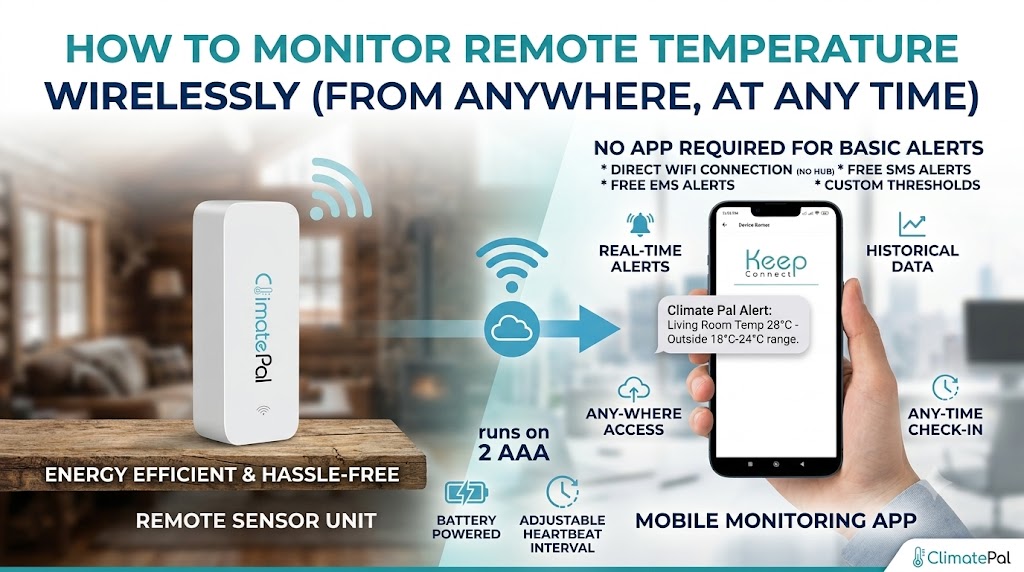
That’s simple with Climate Pal. It checks the temperature and humidity, hooks up to your existing WiFi network, and sends you text or email alerts when the readings are outside the range you set.
Why Remote Temperature Monitoring is Important
Temperature and humidity can fluctuate rapidly, especially in spaces that aren’t occupied on a daily basis.
A heater can die overnight. A greenhouse vent can be left closed on a hot day. An air-conditioning system can go down in a server room. There is now excess humidity in the storage area, but visible moisture may not appear for a long time.
Conventional thermometers are only useful if someone is there to read them. What a wireless temperature monitoring system gives you is something far more useful: a warning while you’re somewhere else.
That early warning gives you time to react. You may be able to call a property manager, change the heat or air conditioning, move things that are sensitive, check equipment or send somebody to look at the place before it gets worse.
Gardens & Greenhouses
Plants are often very sensitive to sudden changes in temperature and humidity.
A cold night could hurt seedlings or tropical plants. Too much heat can stress crops, and dry out soil quicker than expected. Too much humidity can lead to a mold or fungus problem, while dry air can affect moisture-sensitive plants.
A WiFi temperature sensor allows greenhouse owners to set high and low limits based on what they are growing. When the reading goes outside that range the sensor can send an alert so the owner can check the heaters, fans, vents, shade systems or irrigation.
This is very helpful for the hobby growers and the small greenhouse operators who can’t stay at the growing area all day.
Holiday homes and remote rentals
A vacation rental may sit empty between guests, but temperature-related problems don’t wait for someone to arrive.
If the heating system fails, cold weather can cause plumbing problems. Too much indoor heat during summer can ruin furniture, electronics, food or make guests uncomfortable. High humidity can also create conditions that encourage condensation, mold, and musty smells
Remote temperature monitoring offers property owners another level of awareness. You can set limits for the property and get notified if the temperature or humidity moves beyond them.
It can also be used in conjunction with Water Pal to detect leaks and Power Pal to monitor power outages for broader property protection.
Together these devices enable you to monitor the three major risks to an unattended property: temperature, water and power.
Data equipment and server rooms
Computer equipment creates heat and server rooms frequently use cooling systems to keep temperatures in a safe range.
If an air conditioner fails, a vent is blocked or the room temperature suddenly increases, equipment could begin running hotter than intended. Too much humidity can cause condensation problems and too dry air can increase static electricity.
A temp and humidity sensor can be useful for IT teams and small businesses to monitor the environment around servers, network equipment, storage systems and other electronics.
Climate Pal does not control the cooling system but it can send an alert to the right person if conditions go outside the selected range. That warning might allow staff to investigate before equipment begins shutting down or overheating.
Wine cellars and storage units
Stored items are often affected by temperature and humidity.
Extended exposure to an inappropriate environment can harm documents, wooden furniture, musical instruments, photographs, electronics, collectibles, and inventory. A consistent environment is good for wine storage as well since large temperature changes can affect the quality over time.
The remote temperature sensor lets you see into these spaces without frequent visits.
You can set a temperature range and a humidity limit for a storage unit, basement, archive or wine cellar depending on what is being stored. If the environment changes, you will know that the space needs some attention.
WiFi Sensor vs Bluetooth vs Wired – Which One is Better?
You can get good readings from WiFi, Bluetooth and wired temperature sensors, but each is meant for different situations.
A Bluetooth sensor typically communicates directly with a nearby phone or tablet. It’s convenient for checking in your neighborhood, but you’ll usually have to stay within Bluetooth range of the user. That makes it less useful for keeping an eye on a property across town or hundreds of miles away.
A wired sensor can provide stable communication and constant power, but installation may be more complicated. Running cables may not be practical in rental properties, greenhouses, storage spaces or finished rooms.
A WiFi sensor can connect to an existing wireless network and transmit information over the internet. If you already have WiFi coverage in the area, this is a great option for remote temperature monitoring.
Climate Pal is battery-operated and requires no separate hub. Once set up and connected to WiFi, it can monitor at whatever interval you choose and send SMS or email alerts when readings go over your thresholds.
What you should do depends on your goal:
Select Bluetooth for local and short range monitoring.
If you want something that’s going to stay put and you want continuous power, go with wired equipment.
Choose WiFi when you want to get alerts from a property or room when you are away.
WiFi offers the best compromise between convenience and remote access for most vacation rentals, greenhouses, offices, server rooms and remote properties.
How To Set Up Remote Temperature Monitoring – Step-by-Step
There’s no need to complicate a wireless temperature monitoring system with wiring or professional installation.
Climate Pal runs on two AAA batteries and connects to your existing WiFi network. The following steps describe the general process of setup.
Step 1 — Insert Batteries and Power On
Insert two AAA batteries into Climate Pal and switch it on.
Place the sensor in the area you want to monitor, but don’t put it in its final position until you have finished the setup and alert testing.
For best readings, keep the sensor away from direct sunlight, heating vents, open windows, radiators or heat producing appliances. These sources can cause the reading to be a single small hotspot rather than the entire room.
The device should also be within a good WiFi coverage area.
Step 2 — Join a Wi-Fi network
On your phone, tablet or computer, go to the WiFi settings and look for the Climate Pal setup network.
Attach the device to the broadcast network. The setup page might open automatically. If it does, stay connected to the Climate Pal network and open the setup address in your browser.
On the setup page, choose the WiFi network that you want Climate Pal to use and enter the network password.
As the sensor uses WiFi to send alerts remotely, it’s important to select a network with reliable coverage at the exact location where you will be installing the device.
Save settings and give the sensor time to connect.
Step 3 – Define temperature and humidity thresholds
Then select the conditions that you want to trigger an alert.
Climate Pal lets you set temperature thresholds in either Celsius or Fahrenheit. You can set an alert for readings that go above or below a temperature you choose.
You can also set humidity thresholds. For example you might want an alert when humidity is too high for a storage room or too low for a greenhouse.
Select limits that are appropriate for the environment you are protecting, not one set of limits for all locations. A greenhouse, wine cellar, server room, or vacation home may all require different settings.
Don’t set the thresholds too close to normal conditions where harmless variations cause frequent alerts. The idea is to get a warning when the situation might really attract some attention.
Step 4 — Test your SMS/email notifications
Test the notification process before relying on the device.
Choose if you want to be notified by email, by SMS or by both. Check that the contact details are completed correctly.
You can set an instant test notification threshold close to the current reading. After you see the message is getting through, reset the threshold to the level appropriate to your space.
Testing is a critical step that makes sure the sensor is plugged in, the threshold is working and the alert is reaching the right person.
After testing, install Climate Pal in the final monitoring location.
Best Places to Install a Wireless Temperature Sensor
A wireless temperature sensor is useful anywhere environmental conditions might change and affect comfort, safety, property, equipment, plants, or stored goods.
Common places include:
- Indoor gardens and greenhouses
- Holiday homes and holiday house rentals
- Remote properties and cabins
- Server rooms & network closets
- Storage rooms and warehouses
- Cellars, crawl spaces
- Wine cellars
- Storage lockers
- Workspaces and Offices
- Garages and repair shops.
- RV’s and seasonal properties
- Rooms with musical instruments or collections
The best location depends on what you want to monitor.
Place the sensor in a greenhouse, near the plants, but out of direct spray or sun. Put it in a server room, close to the equipment, but don’t block the airflow. In a vacation rental, select a place that is representative of the indoor temperature overall, not next to a window or vent.
For larger buildings, or rooms or floors with very different conditions, several sensors may provide better coverage than one sensor in a central location.
What to Look for in a Remote Temp Monitor
Not all remote temperature monitors are created equal. Consider how the device connects, how it sends alerts, and what conditions it can measure before choosing one.
WIFI connection
The remote monitor needs to be able to connect to the internet from where you want to protect.
Make sure there is a strong WiFi signal in the greenhouse, server room, basement, storage area or rental property where the sensor will be located.
Humidity and temperature monitoring
But temperature alone doesn’t tell the whole story.
Humidity can impact plants, stored goods, electronics, wood, wine, documents and indoor comfort. A sensor that measures both will give a more rounded picture of the environment.
Custom alert thresholds.
Different spaces have different limitations.
Select a sensor that provides the ability to set high and low temperature thresholds, humidity thresholds Custom settings make the device useful for a wider range of applications.
E-mail and SMS notification
You will receive alerts through a way you check regularly.
SMS is good for urgent alerts, and email is convenient for records or multiple people. Having both options gives users more flexibility.
Installation with battery power
A sensor powered by a battery can be installed without the need to position it near an electrical outlet or to run a power cable.
This is particularly handy for greenhouses, storage areas, rental properties and anywhere that there may be limited access to an outlet.
No mandatory hub
A sensor that connects directly to WiFi is easier to install because it doesn’t need another gateway or hub.
That means fewer devices to set up and fewer pieces of equipment that can go offline.
Battery monitoring
A remote sensor is only useful as long as it has power.
Climate Pal also has configurable notifications at the battery level, so users can be notified when the battery power reaches the level they set.
Historical data (if available)
Simple alerts should suffice if users only need to know when conditions become unsafe.
Some want historic graphs, long-term trends, advanced schedules or centralized management of multiple devices. For those users who need those added capabilities, Climate Pal offers optional access to Keep Connect Premium Cloud Services.
To get started simply, visit the Climate Pal product page.
Climate Pal wirelessly monitors temperature AND humidity and sends you instant SMS or email alerts when the readings are out of your range. No hub. No subscription. Battery-operated. $49.99.
FAQ
How accurate is the WiFi temperature sensor?
The accuracy of WiFi temperature sensors depends on the sensor hardware, placement, airflow, and surrounding conditions. For best accuracy, keep the sensor away from direct sunlight, heating vents, exterior doors, radiators and appliances that generate heat. It’s also a good idea to compare a newly installed sensor with a trusted reference device before using it in a highly sensitive application.
How long will the batteries run?
Battery life will depend on the quality of the battery, the monitoring interval chosen, WiFi signal strength, alert activity ,and the temperature surrounding you. Climate Pal uses two triple-A batteries and sleeps between the heartbeat intervals you set in order to save energy. Real world conditions are variable, so it is better to monitor reported battery level than to promise one fixed battery lifespan.
Can it also measure humidity?
Yes, Climate Pal is a sensor for temperature and humidity. Humidity thresholds can be set by the user and if the reading is higher or lower than the chosen level, the user will be notified by SMS or e-mail. That makes it perfect for use in greenhouses, storage areas, wine cellars, server rooms, vacation homes and other places where moisture levels matter.